FreeNo sign-upYour plan stays on your computer
Project Planning Tool
Before promising a date, find out whether the work fits it. List all the work and test it against the 100% rule, find the one chain of work that sets the finish, put odds on the date, check nobody is booked twice, give every risk an owner and hold the spare time in one place, then keep a Gantt chart true every week until the finish. Six stages, ending with the actual durations against your estimates.
The tour runs all six stages on an example furniture retailer opening a second showroom in a new shopping center, with 22 weeks to the opening day. Nothing in it touches your own work. Stages 1 to 5 are planning: about two weeks for a project of a few months. Stage 6 starts when the work does and runs to the finish, ten minutes a week, with a look at the risks every two weeks.
Six stages, in order
Each stage asks one question and hands its answer to the next. You can stop after any stage: save your progress file, and pick up later on any computer. The project planning playbook explains the method behind each one.
-
Stage 1 of 6 · Work breakdown structure
What is all the work?
3 to 5 days
- You bring
- What the project must deliver and by when, and the people who will do the work.
- You get
- Every branch broken into work packages, each one tested against the 100% rule, named as something produced, and given one owner. The work your first list missed, flagged.
How work breakdown structure worksUse the Work Breakdown Structure Tool on its own
-
Stage 2 of 6 · Critical path
Which work sets the finish date?
1 to 2 days
- You bring
- The activities, each with a most-likely duration and what it must wait for. Drafted from your work packages.
- You get
- The critical path, the shortest the project can be, the float on every other activity, and the arrows worth questioning when the plan runs past the date.
How the critical path method worksUse the Critical Path Calculator on its own
-
Stage 3 of 6 · PERT
How sure is the date?
1 to 2 days
- You bring
- Three estimates for the activities that count, optimistic, most likely and pessimistic, and what a late finish costs.
- You get
- The expected finish, the odds of making the date, the second path that counts too, the activities with the widest ranges, and whether buying time is worth what it costs.
-
Stage 4 of 6 · Resource allocation
Is anyone booked twice?
Half a day, then weekly
- You bring
- The people on the project, each activity's share of their time, and everything else they do in the same weeks.
- You get
- Each person's load week by week, the clashes over 100%, moves of work that has float with what each does to the busiest person, and who decides between claims.
How the resource allocation matrix worksUse the Resource Allocation Matrix on its own
-
Stage 5 of 6 · Risk register
What could knock it off course?
1 to 2 days, then every 2 weeks
- You bring
- What could go wrong, from the people who know the work. The tool drafts likely risks from your plan.
- You get
- Each risk as a cause, an event and a consequence, scored, treated and owned, with an early sign; one shared buffer with one person holding it; the review dates.
How risk management worksUse the Risk Register Tool on its own
-
Stage 6 of 6 · Gantt chart
Is it still on track?
Every week
- You bring
- Each week, which activities started and finished, the work packages finished, and new dates for work running late.
- You get
- The chart redrawn from what happened, the critical path now, the buffer left update by update, and at the finish, the actual durations against your three estimates.
How the Gantt chart worksUse the Gantt Chart Maker on its own
What you finish with
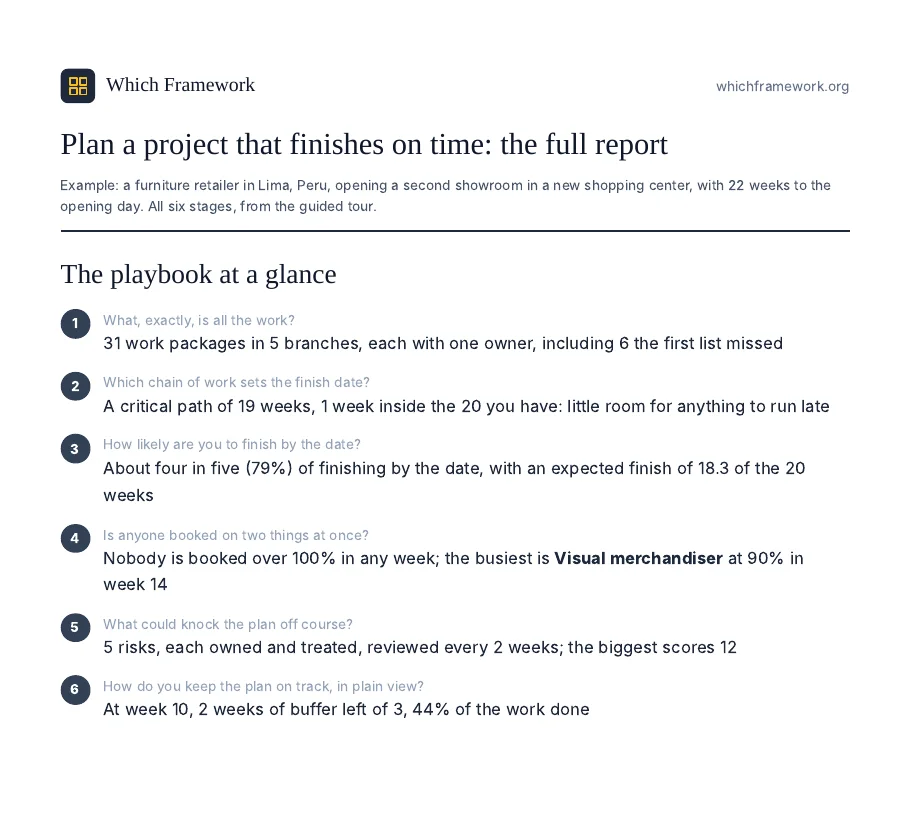
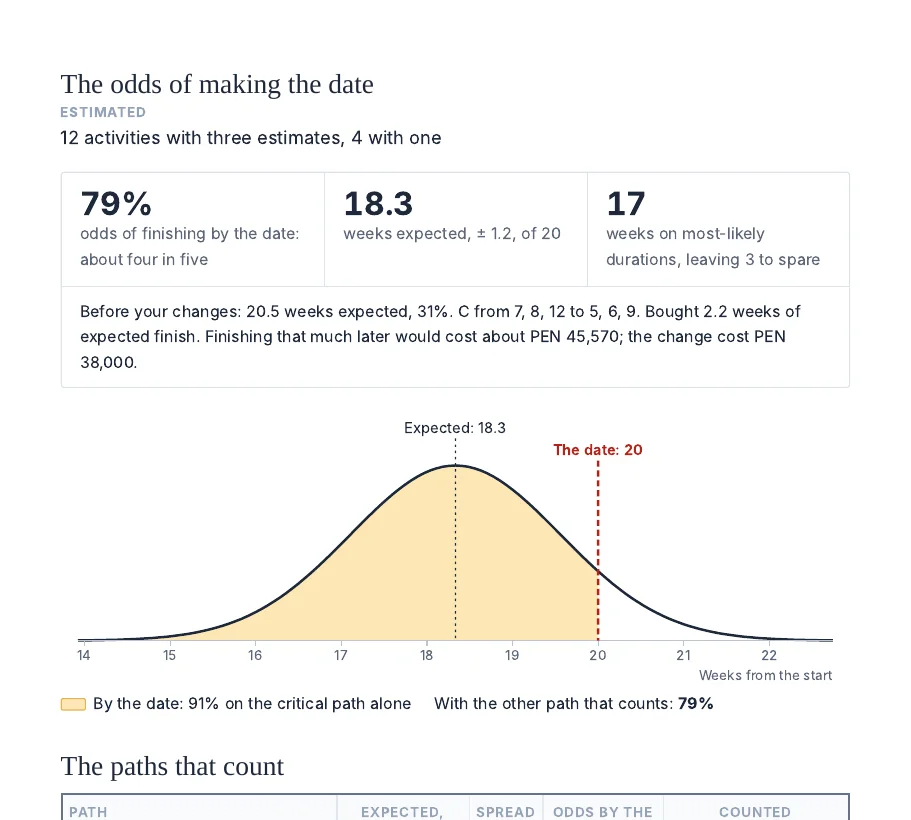
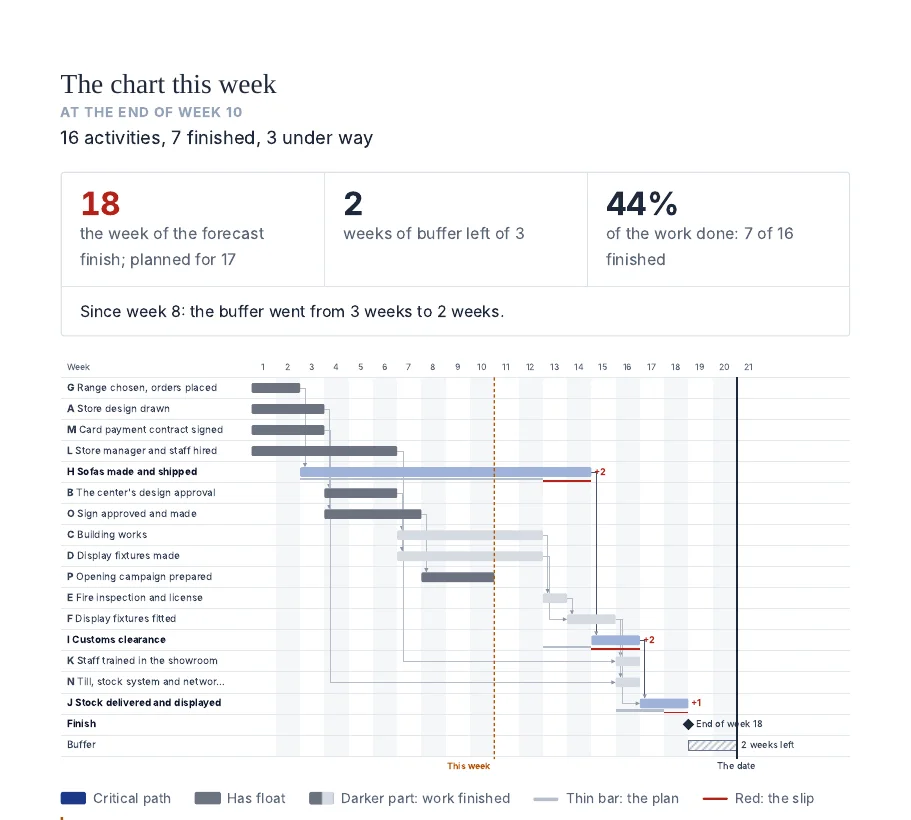
From the guided tour: a furniture retailer in Lima, Peru, opening a second showroom in a new shopping center, with 22 weeks to the opening day.
Download the example report (PDF, 19 pages)A PDF report of the whole playbook. One headline for each stage, as in the example, then each stage's full results: the charts, the tables and the diagnosis, with what it means and what to do next. It ends with this week's Gantt chart and the buffer update by update.
A progress file you keep. An Excel workbook with a sheet for every stage, updated each time you save. Choose it on this page or on any stage, and the playbook reopens where you left off. Reopen it each week for the update, and when the work finishes, it compares the actual durations with your estimates.
Checks along the way. A branch nobody can say is complete holds stage 1; a plan longer than the time you have is sent back to the critical path; odds below what you can accept ask you to buy time where it counts; anyone over 100% in a busy week, a risk with no owner, and work running late with no new date each stop the tool until they are settled.
Questions
Is it free?
Yes. There is no sign-up. The PDF report asks for an email address; everything else works without one.
Where does my plan go?
Work packages, activities, people and risks stay in your browser and in the progress file you download. To write each stage's diagnosis, the page sends our server only figures and the places of items in your lists, never the names or the words.
Do I have to do all six stages?
No. Each stage also works on its own, from the tools page. If you already have a work breakdown, start at stage 2. Stages 3 and 4 can be skipped when durations barely vary and everyone works only on this project; stages 5 and 6 are what keep the plan honest, so the playbook keeps them.
Is it project management software?
No. It plans one project with the methods behind project management software, and keeps its chart true week by week, in your browser and an Excel file. There are no accounts, tasks or notifications.
Can several people work on it?
Yes, by passing the progress file. Save it after a stage, send it to a colleague, and they choose it on this page to carry on from there.
How is this different from the playbook article?
The article explains the method and follows one company through it. The tool runs the same six stages on your own project, and writes the diagnosis at each one.