FreeNo sign-upYour notes stay on your computer
Agile Project Management Tool
When a long plan keeps slipping and nothing reaches customers, switch to short sprints that each deliver something usable. Find out what customers value and where work waits, put the work in the order a customer meets it, settle who decides, run each sprint against the time the team really has, keep interruptions out of the sprint, and measure whether it is working. Six stages, ending with a team that delivers every two weeks and the measures that show it.
The tour runs all six stages on an example chain of 40 hardware stores in Monterrey, Mexico, whose nine-month plan for online ordering is four months in, behind and unreleased. Nothing in it touches your own work. About two weeks for stages 1 to 3, before the first sprint. Stage 4 then runs every sprint; stages 5 and 6 begin in the first month, with a monthly look at the measures.
Six stages, in order
Each stage asks one question and hands its answer to the next. You can stop after any stage: save your progress file, and pick up later on any computer. The agile sprints playbook explains the method behind each one.
-
Stage 1 of 6 · Lean principles
What do customers value?
A week, most of it interviews
- You bring
- What 8 to 12 customers said they value, and the dates one recent feature moved through each step from request to release.
- You get
- What customers value against what the plan spends on, in one sentence, and how much of the feature's time was spent waiting, with the longest wait named.
How lean core principles worksUse the Lean Principles Tool on its own
-
Stage 2 of 6 · User story map
What should we build first?
A 1-day workshop
- You bring
- The feature list or backlog you have, and the people who know each step of the customer's journey.
- You get
- A backbone of the customer's activities, the fewest features that get a customer from end to end, and the rest of the backlog in order behind them.
How user story mapping worksUse the User Story Map on its own
-
Stage 3 of 6 · Scrum team
Who decides what?
2 to 3 days to agree
- You bring
- Who would order the backlog and whether they can say no, who would be Scrum Master, and the people doing the work.
- You get
- The Product Owner, Scrum Master and Developers checked, a Product Goal, and a Definition of Done that means usable, not just built.
How the Scrum framework worksUse the Scrum Team Setup Tool on its own
-
Stage 4 of 6 · Sprint planning
What happens in each sprint?
Two weeks per sprint
- You bring
- The sprint length, how many people do the work and their days off, and the stories estimated in person-days.
- You get
- The five events on the sprint's days, the time left for stories, a plan with one Sprint Goal, and a record of each sprint with its one change.
How agile sprint planning worksUse the Sprint Planning Tool on its own
-
Stage 5 of 6 · Eisenhower matrix
What happens to requests mid-sprint?
A 2-week log, then an hour
- You bring
- Every request that reached the team over two weeks, with who sent it.
- You get
- Each request as Do, Schedule, Delegate or Delete, a rule and a person for each kind, whether seniority shaped the sort, and the share of each sprint to keep free.
How the Priority Matrix worksUse the Eisenhower Matrix Tool on its own
-
Stage 6 of 6 · KPIs
How do you know it is working?
Half a day, then monthly
- You bring
- Four or five measures of what customers get and how work flows; the earlier stages suggest some, with their starting values.
- You get
- Each measure typed, with an owner who can move it, a start and a target, velocity kept out of the targets, and when to look.
How key performance indicators worksUse the KPI Builder on its own
What you finish with
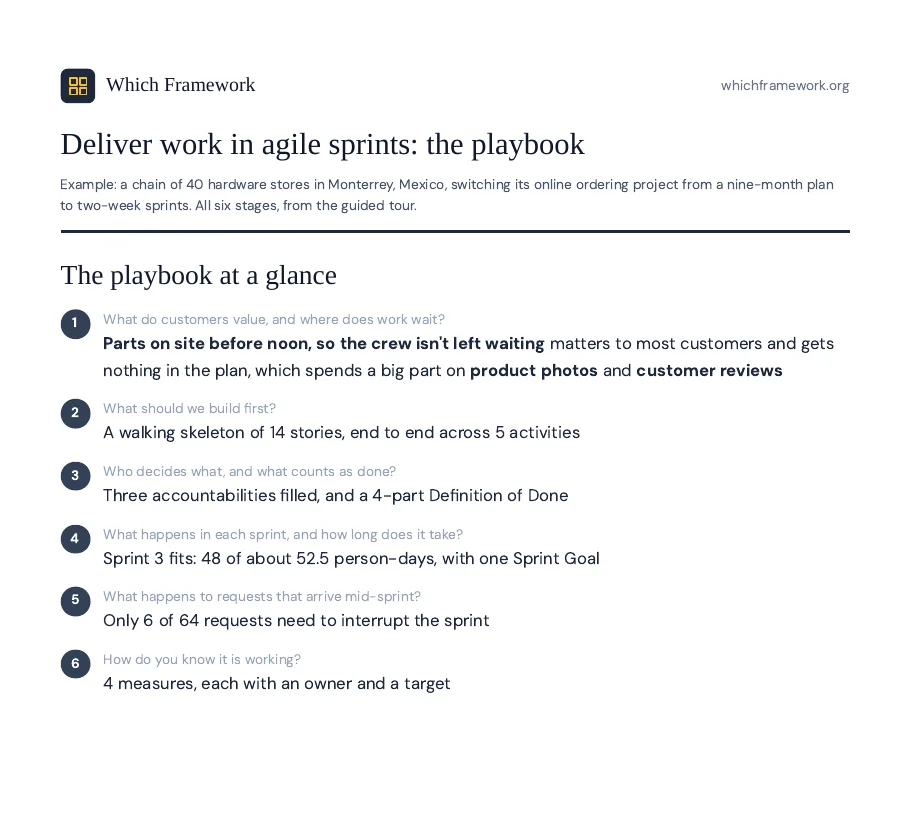
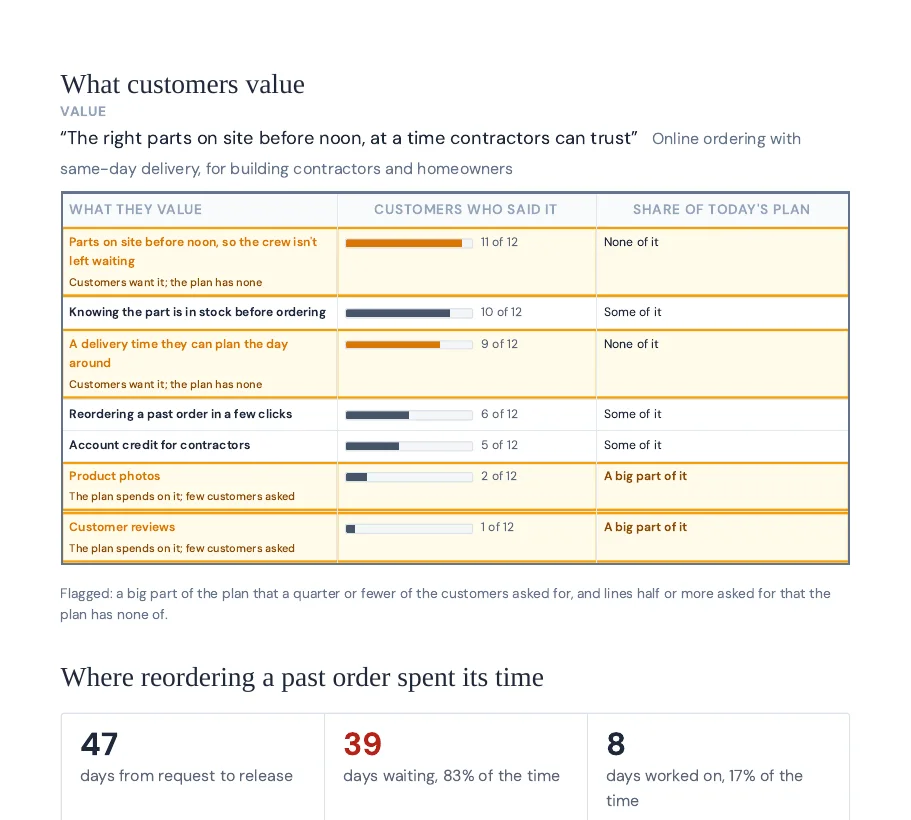
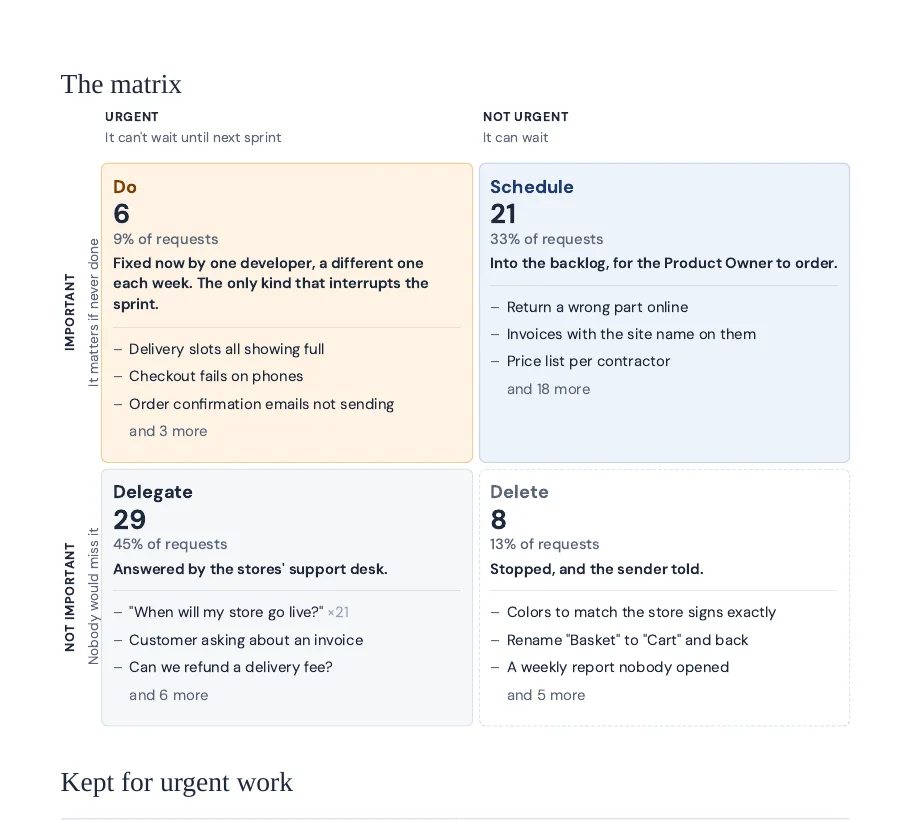
From the guided tour: a chain of 40 hardware stores in Monterrey, Mexico, switching its online ordering project from a nine-month plan to two-week sprints.
Download the example report (PDF, 24 pages)A PDF report of the whole playbook. One headline for each stage, as in the example, then each stage's full results: what customers value and where work waited, the story map and backlog, the team, the sprint and its record, the sorted requests and the measures, with the diagnosis, what it means and what to do next.
A progress file you keep. An Excel workbook with a sheet for every stage, updated each time you save. Choose it on this page or on any stage, and the playbook reopens where you left off. Each sprint is recorded in it, so it grows with the team.
Checks along the way. A plan spent on what few customers asked for, a first release no customer can use end to end, a Product Owner who can't say no, a sprint planned beyond the team's time, most requests counted as urgent, and velocity used as a target each stop the tool until they are settled.
Questions
Is it free?
Yes. There is no sign-up. The PDF report asks for an email address; everything else works without one.
Where do my notes go?
Features, stories, requests and names stay in your browser and in the progress file you download. To write each stage's diagnosis, the page sends our server only the numbers and flags it needs, never the text you typed.
Do I have to do all six stages?
No. Each stage also works on its own, from the tools page. If the backlog is already small and ordered, start at stage 3. Stage 1 can be skipped when the team already delivers small pieces often, stage 2 when the backlog is agreed, and stage 5 when requests rarely arrive between sprints.
Is this only for software teams?
No. Any team that delivers work in pieces can run sprints: marketing, operations, a product team. If the scope is fixed and the date can't move, the Project Planning Tool fits better.
Can several people work on it?
Yes, by passing the progress file. Save it after a stage, send it to a colleague, and they choose it on this page to carry on from there.
How is this different from the playbook article?
The article explains the method and follows one team through it. The tool runs the same six stages on your own team's work, and writes the diagnosis at each one.